> ## Documentation Index
> Fetch the complete documentation index at: https://fema-docs.estou.ai/llms.txt
> Use this file to discover all available pages before exploring further.
# Shipment Block (Admin Block)
> Create and track FEMA shipments directly from each order page.
## What it is
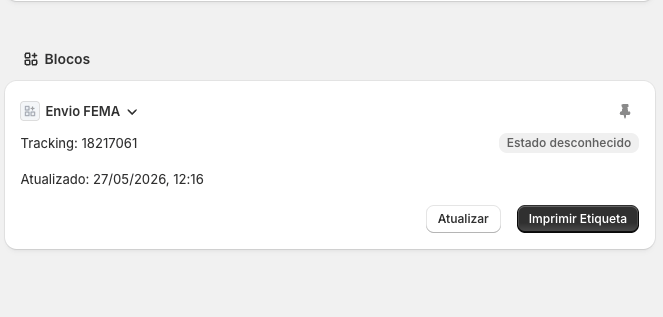
The FEMA block appears in the sidebar of each order in Shopify Admin. It lets you create a shipment, check tracking status, and print the label, all without leaving the page.
 ## Adding the block (first time)
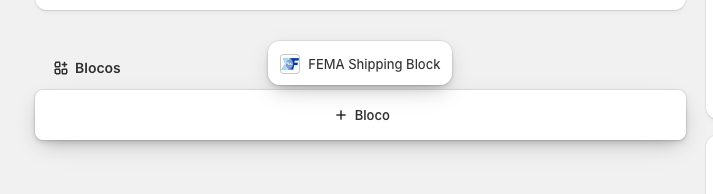
If the block isn't visible on the order page, you need to add it once manually:
1. Open any order in Shopify Admin.
2. In the right sidebar, click the **+** button.
3. Search for **FEMA** in the list of available blocks and click to add it.
## Adding the block (first time)
If the block isn't visible on the order page, you need to add it once manually:
1. Open any order in Shopify Admin.
2. In the right sidebar, click the **+** button.
3. Search for **FEMA** in the list of available blocks and click to add it.
 This setting is saved — you don't need to repeat it for other orders.
## Creating a shipment
When no shipment exists for the order, the block shows:
1. **Package**: select from your configured packages (if any). If none are configured, FEMA's default dimensions are used.
2. **Volumes**: number of volumes (1 to 10).
3. Click **Create shipment**.
The app automatically fetches the delivery address from the order and creates the label in FEMA. The tracking number is added to the Shopify order.
## Viewing an existing shipment
When a shipment already exists, the block shows:
* **Tracking number**
* **Current status** (colour-coded badge)
* **Last updated** (date and time)
Click **Refresh** to query the status directly from FEMA and update the database with the latest information.
## Printing a label
1. Click **Print label**.
2. The label opens in a new tab as a PDF, ready to print.
If the order hasn't been marked as fulfilled in Shopify yet, the app marks it automatically when printing.
## Possible statuses
See the full list of statuses on the [Shipment Statuses](/en/statuses) page.
This setting is saved — you don't need to repeat it for other orders.
## Creating a shipment
When no shipment exists for the order, the block shows:
1. **Package**: select from your configured packages (if any). If none are configured, FEMA's default dimensions are used.
2. **Volumes**: number of volumes (1 to 10).
3. Click **Create shipment**.
The app automatically fetches the delivery address from the order and creates the label in FEMA. The tracking number is added to the Shopify order.
## Viewing an existing shipment
When a shipment already exists, the block shows:
* **Tracking number**
* **Current status** (colour-coded badge)
* **Last updated** (date and time)
Click **Refresh** to query the status directly from FEMA and update the database with the latest information.
## Printing a label
1. Click **Print label**.
2. The label opens in a new tab as a PDF, ready to print.
If the order hasn't been marked as fulfilled in Shopify yet, the app marks it automatically when printing.
## Possible statuses
See the full list of statuses on the [Shipment Statuses](/en/statuses) page.